The firewall rules you actually open.
Most published VCF flows never need a firewall rule. The planner takes the full Broadcom port catalogue and, in 12 guided steps, cuts it down to the consolidated rule set your design really needs, with a reason recorded for every exclusion.
candidate rules from the Broadcom catalogue, split per domain, plus AI-suggested egress
guided steps that remove flows which do not apply to this design
consolidated rules the customer actually opens, a 79% reduction
−79%Every exclusion is explained and traceable, so the firewall team sees why a flow was left out, not just that it was.
Why the raw ports.vmware.com rule set is hard to use
The Broadcom ports catalogue is a complete list of every port for every product. It is not a firewall design. Each row below is a problem hit on real engagements, and the planner step that fixes it.
| Challenge | What goes wrong | Fixed in |
|---|---|---|
| No mapping to design | Rules list products and ports, not the VLANs and subnets in this design | Step 2 |
| Endpoint placement | Nothing says which components share a VLAN or where each one lives | Steps 2, 11 |
| Everything is in scope | Every product, add-on, shared service and feature, deployed or not | Steps 3 to 6 |
| Rules off the firewall | Flows between VLANs routed on the ToR never reach a firewall | Step 7 |
| Rules in the same VLAN | Layer 2 traffic is listed as if it needs a firewall rule | Step 11 |
| Internet URLs missing | Depot, licensing and HCL URLs live in KBs and TechDocs, and they change | Step 9 |
| Customer exclusions | No overlay, no VI workload domain, offline or proxied depot | Step 10 |
| Sprawl, no audit trail | One line per port, and no record of why a rule was dropped | Steps 8, 12 |
A 12-step guided assessment
Follow a live run of the ACME assessment. Pick any step to see the screen, the problem it solves and what it changed.
1,063 rules down to 224
What the customer gets at the end of the assessment, shown for ACME on network Model 2.
Rules remaining after each step
ACME, Model 2
- Same L2 removes 408 rules
- Consolidation removes 280 more
- AI adds 15 egress rules the catalogue misses
The network model changes the final rule count
Final rules, same selections, by network model
- A shared subnet keeps more traffic inside one VLAN
- ACME runs Model 2, so it opens 224 rules
- Compare models before you commit to a design
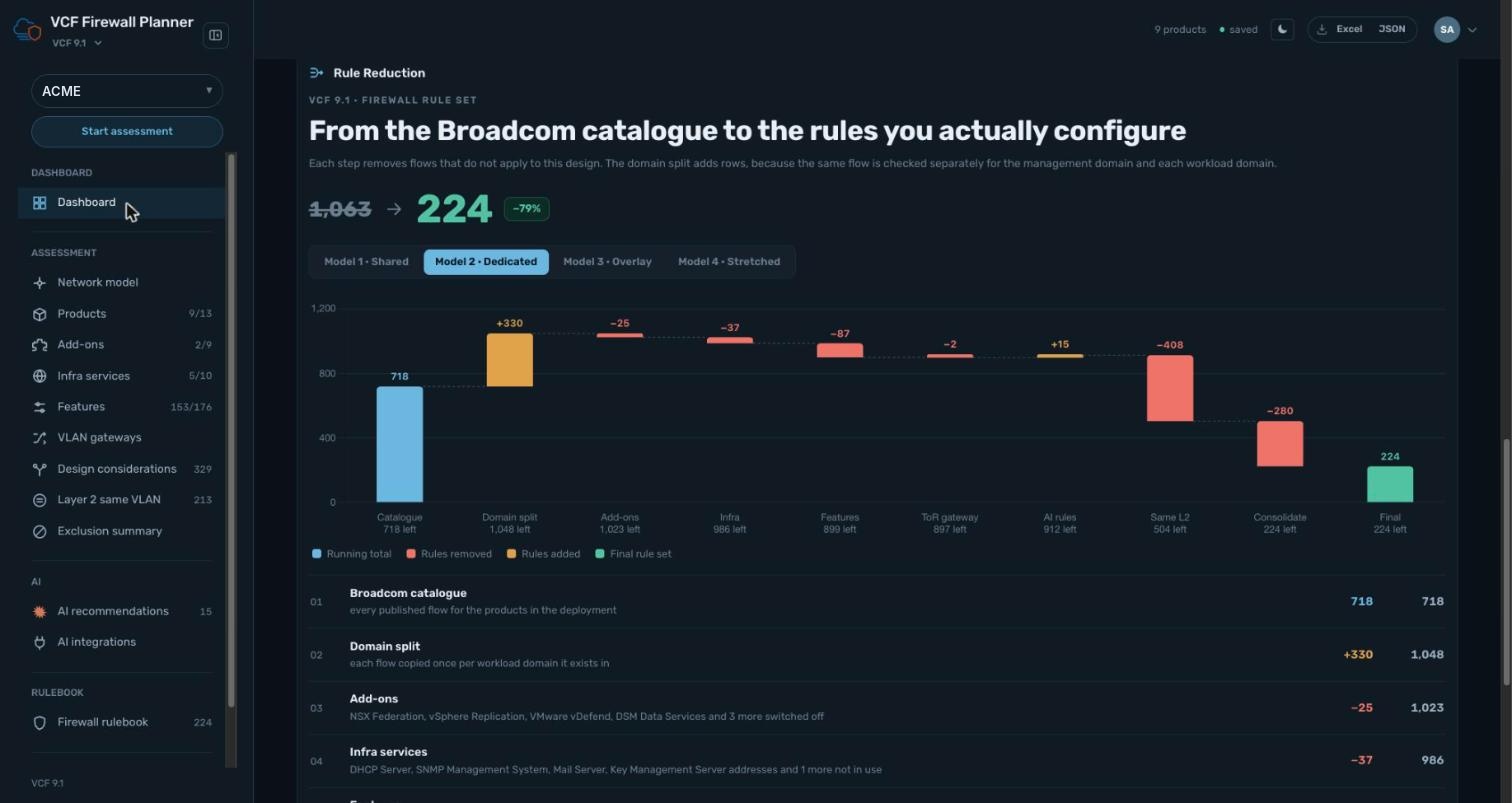
−79% rules for ACME
A waterfall shows the effect of every step. The domain split adds rows; the later steps remove them.
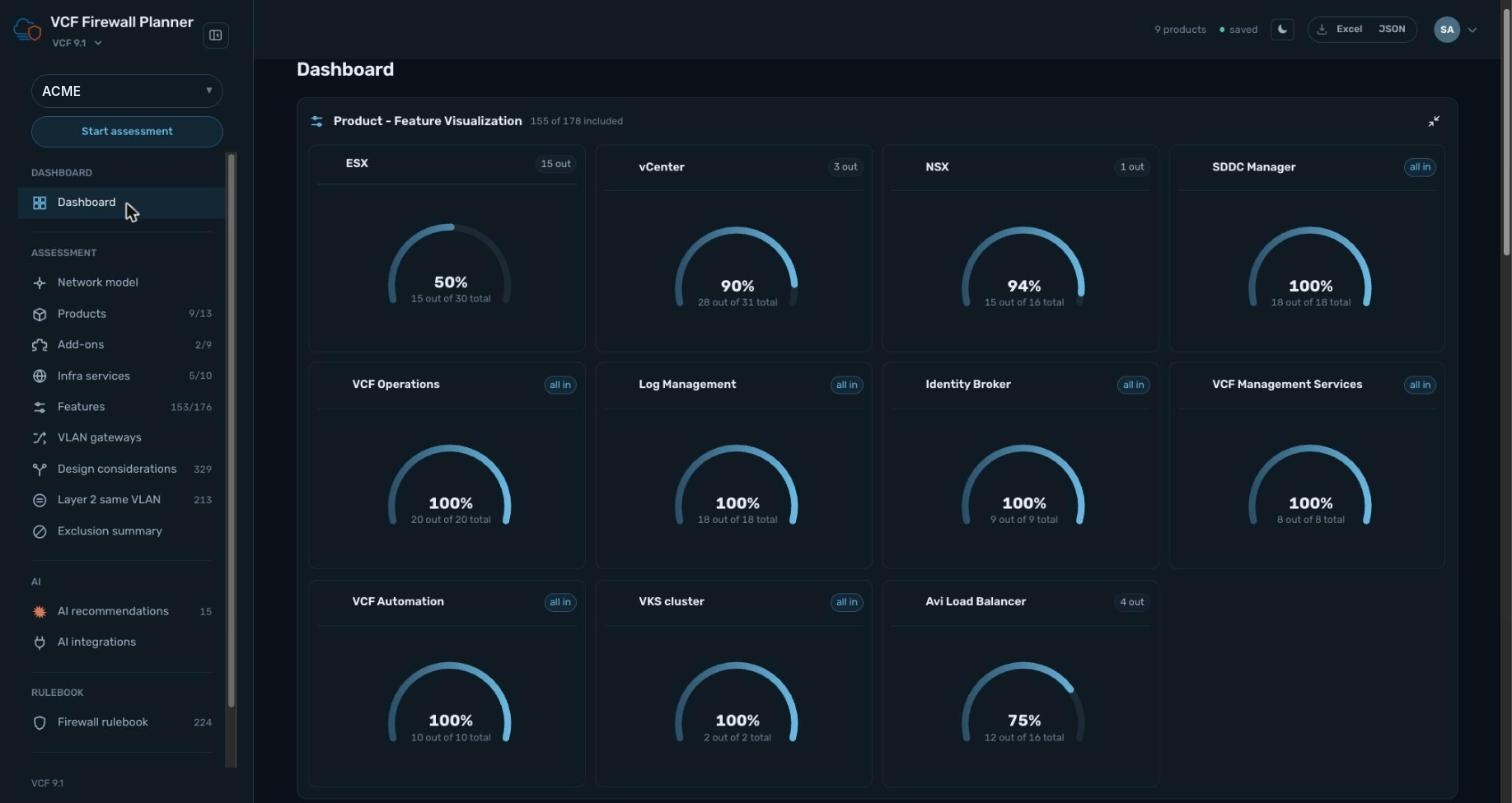
155 of 178 features in scope
See at a glance what is in or out per product across 11 products. ESX 50%, NSX 94%, Avi Load Balancer 75%.
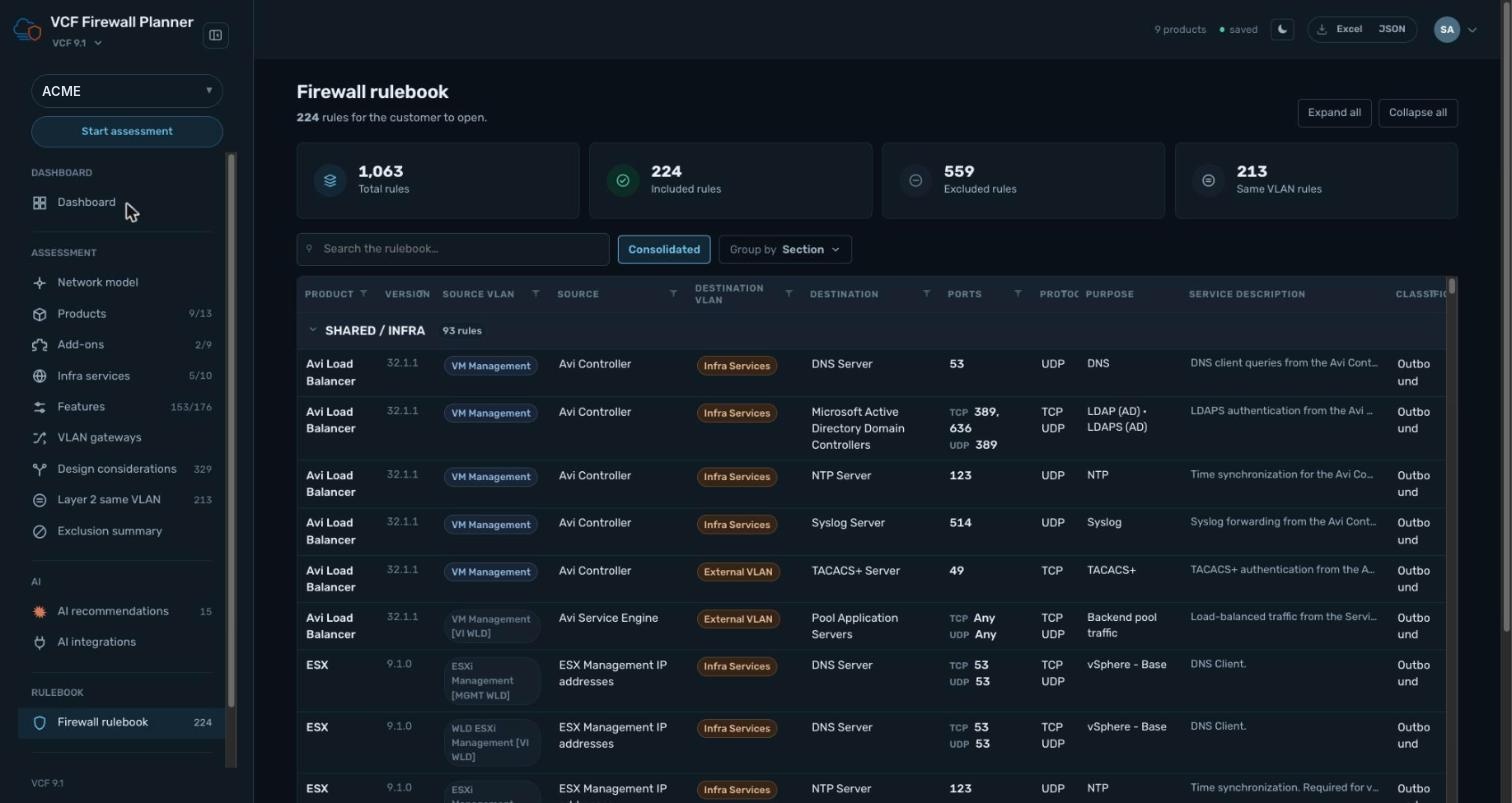
224 rules, ready to hand over
Grouped by section from SHARED / INFRA, with source and destination VLAN, ports, protocol and purpose. Export to Excel or JSON.
Map your IP/CIDRs from the P&P workbook to the rule set Coming soon
P&P workbook
Your Planning and Preparation workbook with the VLANs, subnets and IPs for each component
Automatic mapping
Matches each rule's source and destination to the IP or CIDR from the workbook
Addressed rule set
The firewall rulebook with source and destination IP/CIDR filled in, ready to implement
No more copying addresses by hand from the workbook into the change request.
Next steps
Run your assessment
Walk through the 12 steps for your VCF 9.1 design
Validate with your teams
Review the exclusion summary with network and security
Hand over the rulebook
Export to Excel or JSON and add your IP addressing
Start with the 12 steps.
Turn the full port catalogue into a rule set your firewall team can review.